> For the complete documentation index, see [llms.txt](https://myty.gitbook.io/myty-kit/llms.txt). Markdown versions of documentation pages are available by appending `.md` to page URLs; this page is available as [Markdown](https://myty.gitbook.io/myty-kit/misc/troubleshooting-and-faq.md).
# Troubleshooting & FAQ
How to migrate old version project files to the new MYTY Kit?
1. Back up your original project. **Backup is always important when we migrate something.**
2. In the Project panel, Choose `Assets` and delete the `MYTY Kit` and `Editor` folders.
3. Open the Package Manager window, click the ✚ button in the upper left corner, and select `Add package from git URL...`
4. Copy and paste `https://github.com/Off-Live/myty-kit.git?path=/Assets` and click the `Add` button.
5. After adding MYTY Kit, in the header tab, click `MYTY Kit > Migrate`.
6. Click the `Migrate Adapters`. The migration is done! Click the `▶️(Play)` button and check it works well. \  💡 This migration process **may not work if you are using custom motion adapters** or a MediaPipe object not in prefab, then this migration process may not work. If you have any difficulty in migration, please contact [MYTY Team](https://discord.com/invite/myty).
I imported a PSB file, but its sprites are not visible.
The 2D PSD Import Package may not be installed in the project file. You can install 2D PSD Import Package in the following way.
1. In the header tab, select `Window > Package Manager` to open the Package Manager window.\

2. Click the `Packages tab` in the upper left corner and change to `Unity Registry`. After selecting `2D PSD Importer` in the Packages group, click the `Install` button at the bottom right .\ 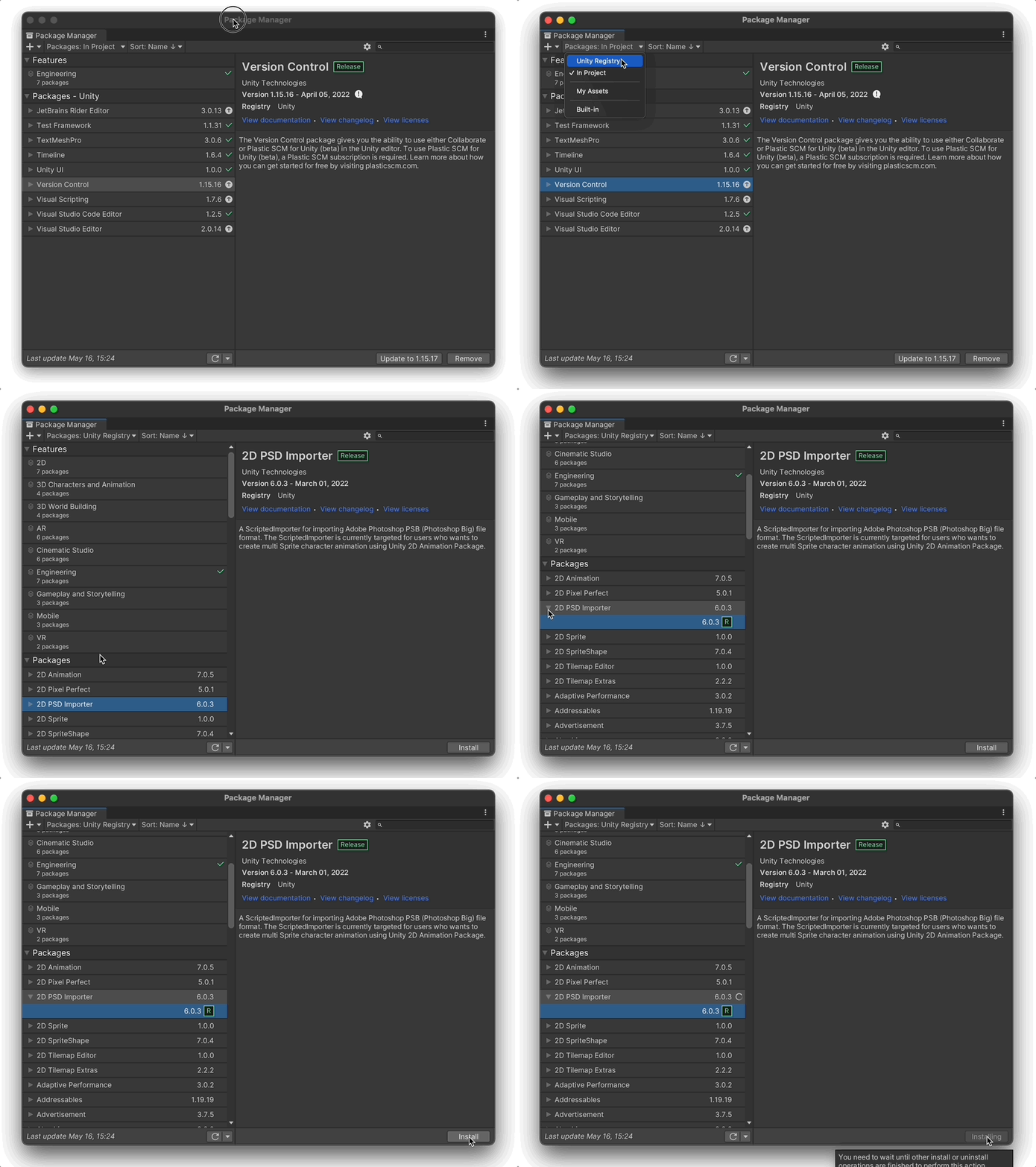
Can a sprite image contain an 'alpha channel'?
Most likely, it works well when pixels with alpha channel values are **surrounded by pixels with no alpha channel values**.
 **Requires to edit geometry manually** when transparency image is not surrounded by pixels with no alpha channel values.
 Before
 After
Before
 After
The required modules did not get installed with the Unity Editor.
You can install additional required modules from Unity hub:
1. In the Installs tab of Unity Hub, click the ⚙︎ icon in the Unity Editor.
2. Select the checkbox of required module(s) and click the Install button.\ 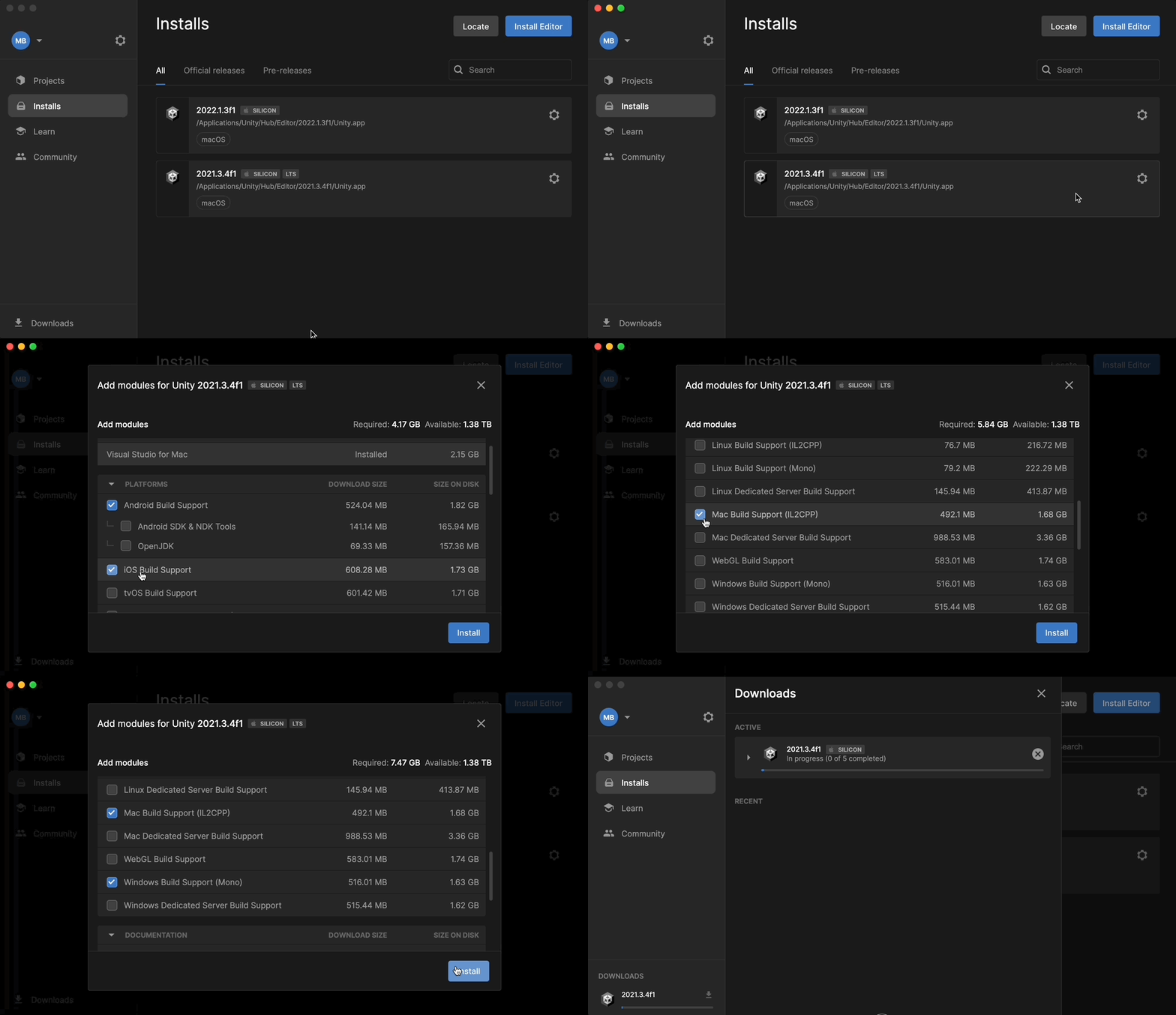
The MediaPipeMotionPackage object can't track my movements.
The input camera may not be selected correctly. Follow the steps below to change the input camera.
1. In the left Hierarchy window, select `MediapipeMotionPack > MediapipeRunner > CameraSource.`\  2. In the Inspector window, go to the Camera Source section and click the Webcam's drop menu. You'll see a list of available cameras. Select the correct input camera and try playing the project again.\

2. In the Inspector window, go to the Camera Source section and click the Webcam's drop menu. You'll see a list of available cameras. Select the correct input camera and try playing the project again.\

Can I replace the PSB or the trait mapping file while creating a MYTY Avatar?
It *is* possible to replace the PSB or the trait mapping file while creating an avatar. But it is not recommended, as unknown compatibility issues may occur. However, you can try it by replacing assets in the directory of the Unity project file. Be sure to back up the project before replacing it.
How to change the Unity Editor version of a project file
1\. In Unity Hub, click the project's `Editor version` and select the version you want to change to.

2\. When the following window appears, click `Change version`.
 3\. When the window below appears, click `Continue`.

3\. When the window below appears, click `Continue`.

{% hint style="success" %}
**Have a question or an idea?** \
If you have a question to ask or an idea to share, participate in [MYTY Kit Community](https://discord.com/invite/myty). We’d love to hear from you.:smile:
{% endhint %}